yDesign by Spacejock Software
Compatible with Windows 10 and newer.
Download yDesign 1.0.0.5 as a self-installing EXE file (recommended)
yDesign exe installer (3.9mb)
OR
Download yDesign 1.0.0.5 in a zip file
yDesign zip file (3.3mb)
yDesign 1.0.0.5 released 04/Nov/2026
• It doesn't matter whether you run the same installer more than once.
• Installing or upgrading yDesign will not delete or overwrite your data OR your settings.
• There is no need to uninstall yDesign before running this updater.
• See below for the list of changes
Change Log:
Installing on Windows:
Please note: for three years I signed my installers with SSL certificates, but this year the price is suddenly triple what it used to be. So, no more installer signing, because there is no way I'm paying $600 to code-sign free software.
If you don't want to deal with the Windows security warnings, download the zip version and unpack it into an empty folder.
Otherwise ...
1) Download the installation file. Locate the file and run your normal anti-virus scan on it. Once you're happy it's free of viruses, run the installation file. You should see something like this:
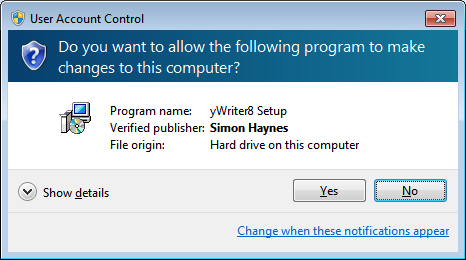
Click Yes to proceed or No to cancel.
Instead of the above, Windows may throw up a warning similar to the one below:
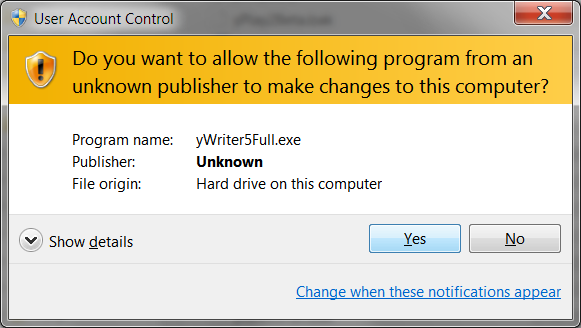
At this point you either trust me (and my company, Spacejock Software) and click 'Yes', or you click 'No' and delete the installer. That's up to you - just bear in mind I set up this website over twenty years ago, and if I was offering dodgy software someone would have closed it down by now, wouldn't they?
I'm also an author with thirty novels in print, and my reputation matters to me!
2) Follow the prompts to set it up. (The defaults are fine)
3) Locate the Spacejock Software entry in your start menu. Click yDesign icon to run the program.
You can run my programs from a memory stick. See
How to run your applications from a thumb drive for more info