
FCharts Pro stock charting/scanning
Runs on all versions of Windows, 32- or 64- bit


Downloading and importing from Commsec


Disclaimer: Any information presented by this website is not suitable as investment advice. You should seek professional investment advice before making any investment decisions.

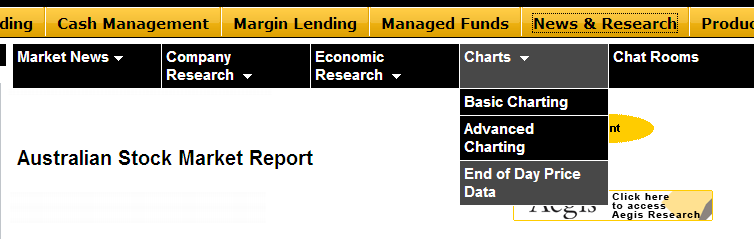
Once logged in to Commsec, click News & Research and then select EOD price data under the 'Charts' menu:

Desc


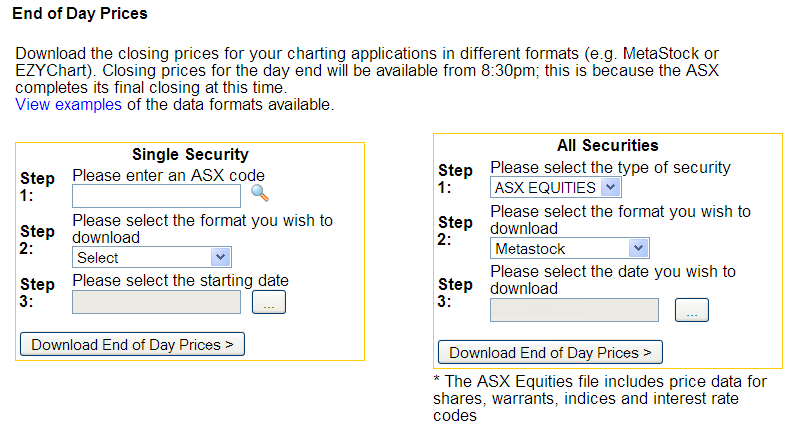
Select ASX Equities, Metastock and today's date, then download:

Desc


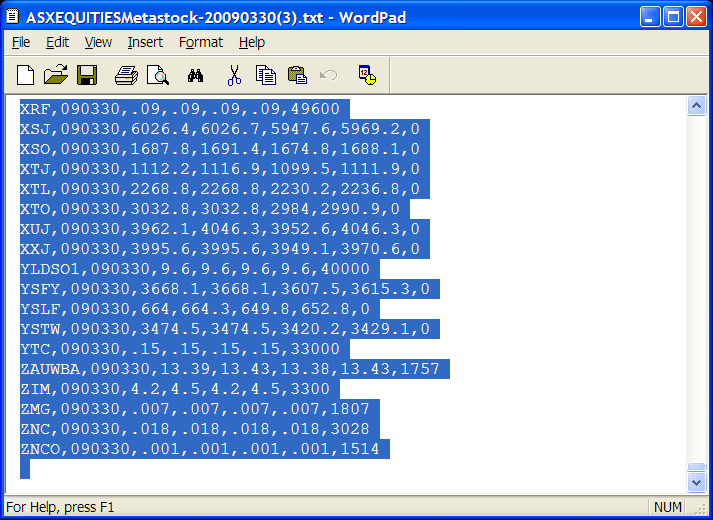
You'll get a text file which you can double-click to open in notepad/wordpad. Press Ctrl-A to select all, then Ctrl-C to copy the selected data to the clipboard:

Desc


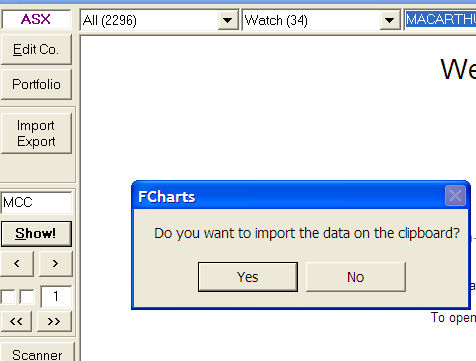
Then right-click the Import/Export button in FCharts to import from the clipboard:

Desc


Once it's finished importing, refresh the current chart. You'll have today's price data for all stocks which have traded.


Follow
Spacejock Software
on Twitter


Latest News
Sonar 3 Quickstart Guide
 
New Beta and Linux pages
 
yWriter 5 released
 
International Backup Day
 
Add to Google


My Software:

Why is it Free?
 
BookDB
FCharts SE
FCharts Pro
HamTime2
RMP3
TrackAMinute2
Sonar3
yBook
yCopy2
yGen2
yLaunch2
yLend
yMail2
yPlay
yPlay2
yRead3
yRoute
yTimer
yWriter5


Site built with
yGen2
by Spacejock Software

yGen2